GitHub
Agenta can notify GitHub when a prompt deployment event happens. This is useful when you want prompt changes to update files in a repository, trigger a workflow, or open a pull request with the latest prompt configuration.
Agenta supports two GitHub delivery modes:
repository_dispatch, which sends a custom event with a structured payloadworkflow_dispatch, which triggers one specific workflow with string inputs
How it works
The flow is simple.
- You create a GitHub workflow in your repository.
- You create a GitHub personal access token.
- You configure the GitHub automation in Agenta.
- When the selected event happens, Agenta calls the GitHub API.
- GitHub starts your workflow.
In practice, this means a prompt deployment in Agenta can update prompt files in your repository or open a pull request automatically.
How Agenta calls GitHub
Repository dispatch
Use repository dispatch when you want GitHub to receive a custom event plus a structured JSON payload.
Agenta sends a request like this:
POST https://api.github.com/repos/<owner>/<repo>/dispatches
{
  "event_type": "environments.revisions.committed",
  "client_payload": {
    "event_id": "01961234-5678-7abc-...",
    "event_type": "environments.revisions.committed",
    "timestamp": "2026-03-10T20:44:12.264Z",
    "created_at": "2026-03-10T20:44:12.264Z",
    "attributes": {
      "user_id": "<user_id>",
      "references": {
        "environment": {"id": "<environment_id>"},
        "environment_variant": {"id": "<environment_variant_id>"},
        "environment_revision": {
          "id": "<environment_revision_id>",
          "slug": "<slug>",
          "version": "<version>"
        }
      }
    }
  }
}
This mode is useful when your workflow needs the full event payload.
Workflow dispatch
Use workflow dispatch when you want Agenta to trigger one known workflow file on a specific branch.
Agenta sends a request like this:
POST https://api.github.com/repos/<owner>/<repo>/actions/workflows/<workflow.yml>/dispatches
{
  "ref": "main",
  "inputs": {
    "event_id": "01961234-5678-7abc-...",
    "event_type": "environments.revisions.committed",
    "timestamp": "2026-03-10T20:44:27.006Z",
    "subscription_id": "<subscription_id>",
    "project_id": "<project_id>"
  }
}
This mode is useful when you want a simple, direct trigger into one workflow.
Agenta also sends these headers to GitHub:
Accept: application/vnd.github+json
X-GitHub-Api-Version: 2022-11-28
Content-Type: application/json
User-Agent: Agenta-Webhook/1.0
X-Agenta-Event-Type: environments.revisions.committed
X-Agenta-Delivery-Id: <delivery_id>
X-Agenta-Event-Id: <event_id>
Idempotency-Key: <delivery_id>
Authorization: Bearer <github_pat>
Create the GitHub workflow
Start by creating the workflow that Agenta will trigger.
The example below uses workflow_dispatch. It fetches the latest prompt configuration from Agenta, writes it to the repository, and creates a pull request if the file changed.
Save this file as .github/workflows/sync-agenta-prompt.yml.
name: Sync latest Agenta prompt

on:
  workflow_dispatch:
    inputs:
      event_id:
        required: true
        type: string
      event_type:
        required: true
        type: string
      timestamp:
        required: true
        type: string
      subscription_id:
        required: true
        type: string
      project_id:
        required: true
        type: string

jobs:
  sync-prompt:
    runs-on: ubuntu-latest
    permissions:
      contents: write
      pull-requests: write

    steps:
      - name: Checkout repository
        uses: actions/checkout@v4

      - name: Fetch latest prompt config from Agenta
        env:
          AGENTA_API_KEY: ${{ secrets.AGENTA_API_KEY }}
        run: |
          curl -X POST "https://cloud.agenta.ai/api/variants/configs/fetch" \
            -H "Content-Type: application/json" \
            -H "Authorization: Bearer ${AGENTA_API_KEY}" \
            -d '{
              "application_ref": {
                "slug": "your-app-slug",
                "version": null,
                "id": null
              },
              "environment_ref": {
                "slug": "production",
                "version": null,
                "id": null
              }
            }' > prompt-config.json

      - name: Create pull request if prompt changed
        uses: peter-evans/create-pull-request@v7
        with:
          commit-message: "chore: sync latest Agenta prompt"
          branch: "automation/sync-agenta-prompt"
          title: "Sync latest Agenta prompt"
          body: |
            This PR updates the prompt configuration from Agenta.
          add-paths: |
            prompt-config.json
If you prefer repository_dispatch, your GitHub workflow should listen like this:
on:
  repository_dispatch:
    types: [environments.revisions.committed]
Create a personal access token
Next, create a GitHub personal access token that Agenta can use to call the GitHub API.
In GitHub:
- Open
Settings. - Go to
Developer settings. - Open
Personal access tokens. - Create a fine grained token or a classic token.
- Grant the token access to the target repository.
- Make sure it can trigger workflows.
Set up GitHub in Agenta
After your workflow and token are ready, configure the integration in Agenta.
- Open your project in Agenta.
- Go to
Settings. - Open
Automations.

- Click
Create automation. - Choose
GitHub. - Choose either
Repository DispatchorWorkflow Dispatch. - Enter the repository as
owner/repo. - If you chose workflow dispatch, enter the workflow file name and branch.
- Paste the GitHub personal access token.
- Save the automation.
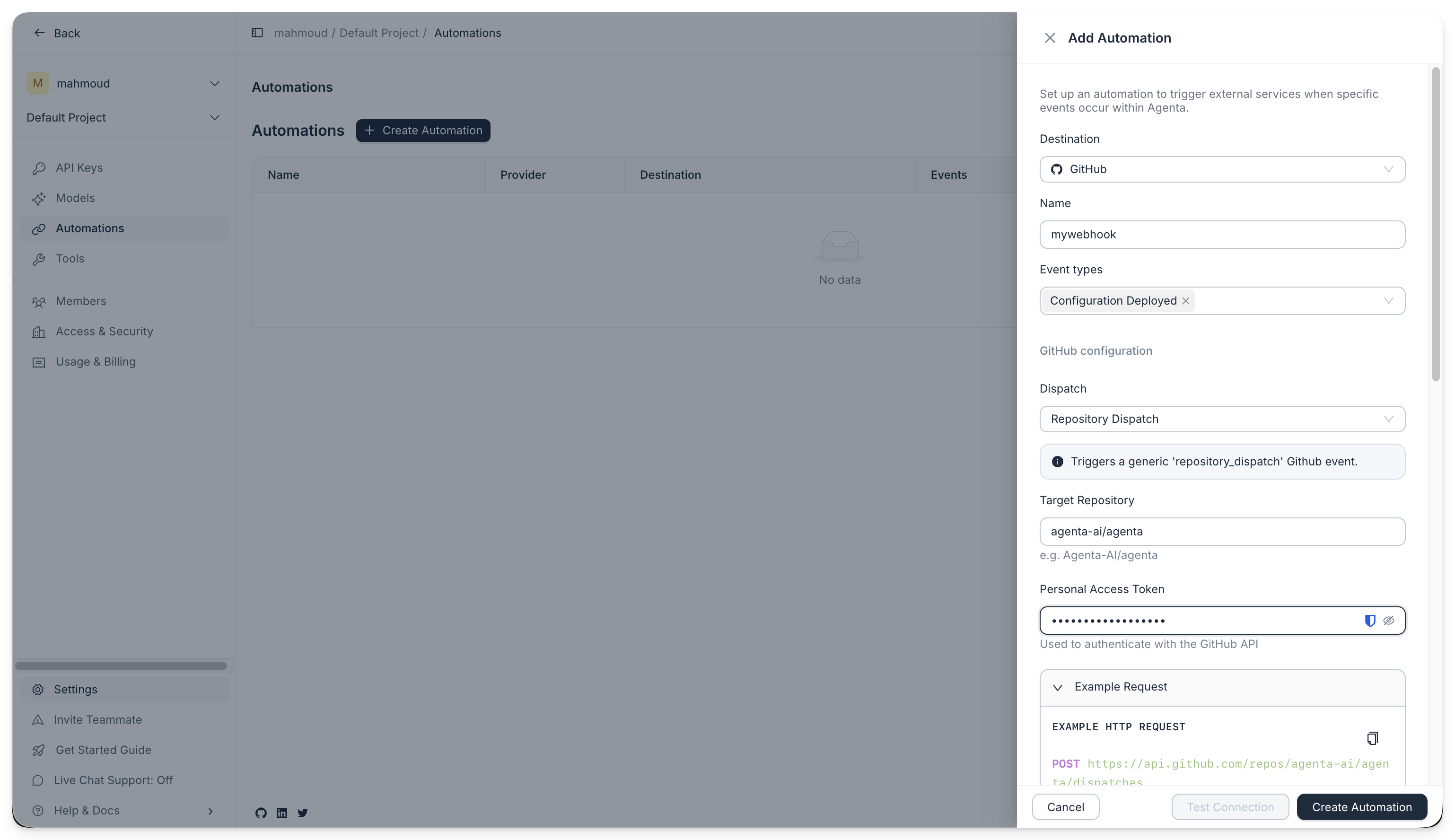
After that, Agenta calls GitHub every time the selected event happens.
Which mode should you choose?
Use repository_dispatch when you want one workflow to receive a richer event payload.
Use workflow_dispatch when you want Agenta to trigger one known workflow file directly.
Troubleshooting
GitHub returns 401 or 403
Check that the personal access token can access the target repository and trigger workflows.
Workflow dispatch does not run
Check the workflow file name, branch, and declared workflow_dispatch inputs.
Repository dispatch does not trigger the expected workflow
Check that your workflow listens for repository_dispatch and that the event type matches the one configured in Agenta.
The workflow needs the latest prompt content
Use the fetch endpoint described in Fetch Prompts via SDK/API.